Email Authentication Explained: SPF, DKIM, and DMARC for Engineers Who Don't Do Email
You’re a solid engineer. You’ve built APIs, deployed distributed systems, maybe even operated infrastructure at scale. But when someone mentions SPF records or DKIM signing, your eyes glaze over a little. You know it’s important — something about preventing spam? — but you’ve never had to care about the details.
This article is for you.
Email authentication is one of those domains where the concepts aren’t inherently difficult, but the terminology is dense, the specs are old, and the practical implications are non-obvious. I’ve spent years building email delivery infrastructure that sends billions of messages, and I’ve watched smart engineers stumble over these technologies not because they’re hard, but because nobody ever explained them clearly.
Let’s fix that.
The Problem: Email Has No Built-In Identity
Here’s the thing that surprises most engineers when they first dig into email: SMTP, the protocol that sends email, has no built-in mechanism for verifying who sent a message. None. When your mail server connects to Gmail’s mail server and says “I have a message from john@example.com,” Gmail has no native way to confirm that’s true.
This is like building an HTTP API with no authentication. Anyone can claim to be anyone. And for decades, that’s exactly how email worked — which is why phishing and spam became such massive problems.
Email authentication is the set of technologies the industry built on top of SMTP to retrofit identity verification. There are three main pieces, and they work together: SPF, DKIM, and DMARC. Think of them as layers — each one addresses a different part of the trust problem.
SPF: “Is This Server Allowed to Send for This Domain?”
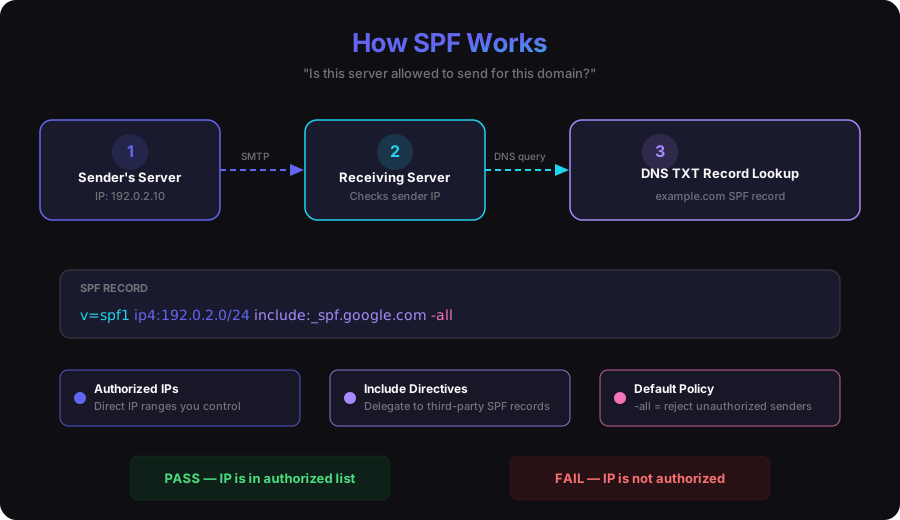
Sender Policy Framework (SPF) is the simplest of the three. It answers one question: is the server that’s sending this email authorized to send on behalf of the domain in the envelope sender address?
How it works
- The domain owner publishes a DNS TXT record that lists the IP addresses (or IP ranges) authorized to send email for that domain.
- When a receiving mail server gets a message, it looks at the IP address of the server that connected to it.
- It does a DNS lookup on the sender’s domain to retrieve the SPF record.
- It checks whether the connecting IP is in the authorized list.
What an SPF record looks like
v=spf1 ip4:192.0.2.0/24 include:_spf.google.com include:sendgrid.net -allBreaking this down:
v=spf1— version identifierip4:192.0.2.0/24— this IP range is authorized to sendinclude:_spf.google.com— also include whatever Google says is authorized (useful if you use Google Workspace for corporate email)include:sendgrid.net— also include SendGrid’s authorized IPs (if you use them as an ESP)-all— reject anything not explicitly authorized (the-means hard fail;~allwould be a soft fail)
What SPF doesn’t do
SPF only validates the envelope sender (the MAIL FROM in the SMTP transaction) — not the “From” header that the recipient sees in their email client. An attacker can pass SPF by sending from their own authorized server while forging the visible “From” header. This is a significant gap, and it’s why SPF alone isn’t enough. We’ll come back to this when we get to DMARC.
SPF also breaks when emails are forwarded. If you send a message to alice@company.com and her mailbox auto-forwards it to her personal Gmail, Gmail sees the message arriving from company.com’s server — not from your authorized IPs. SPF fails. This is a well-known limitation and one of the reasons the industry developed DKIM.
The 10-lookup limit
One thing that catches people off guard: the SPF spec limits you to 10 DNS lookups when resolving an SPF record. Every include: directive triggers a lookup, and those included records can have their own include: directives. If your chain exceeds 10 lookups, the SPF check fails entirely — not just for the overflowing entries, but for everything. If you’re a platform that sends email on behalf of customers, and those customers have their own SPF records with multiple includes, this limit becomes a real engineering constraint.
DKIM: “Has This Message Been Tampered With, and Who Vouches for It?”
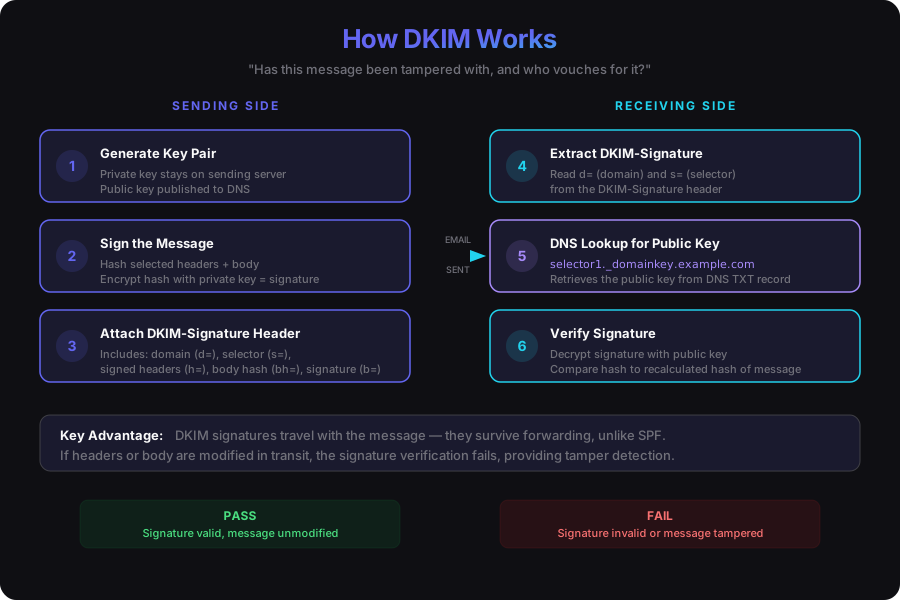
DomainKeys Identified Mail (DKIM) takes a fundamentally different approach from SPF. Instead of checking the server, it checks the message itself. DKIM uses public-key cryptography to let the sender attach a digital signature to each email, which the receiver can verify.
How it works
- The sending organization generates a public/private key pair.
- The public key is published as a DNS TXT record under a specific selector subdomain (e.g.,
selector1._domainkey.example.com). - When the sending mail server sends a message, it uses the private key to generate a cryptographic signature over specific headers and (optionally) the message body.
- This signature is added to the message as a
DKIM-Signatureheader. - The receiving mail server extracts the signature, looks up the public key via DNS, and verifies the signature.
What a DKIM-Signature header looks like
DKIM-Signature: v=1; a=rsa-sha256; d=example.com; s=selector1;
    c=relaxed/relaxed; q=dns/txt;
    h=from:to:subject:date:message-id;
    bh=abcdef123456...;
    b=ABCDEF789012...
The key fields:
d=example.com— the domain claiming responsibility for this messages=selector1— which key to look up (the DNS record will be atselector1._domainkey.example.com)h=from:to:subject:date:message-id— which headers were included in the signaturebh=— a hash of the message bodyb=— the actual signature
Why DKIM matters
DKIM survives forwarding. Because the signature travels with the message, it doesn’t matter how many servers the email passes through — the signature can still be verified against the DNS record of the original signing domain. This is the key advantage over SPF.
DKIM also provides integrity verification. If someone modifies the signed headers or body in transit, the signature check fails. You get both identity and tamper detection in one mechanism.
The operational complexity
Here’s where it gets interesting from an infrastructure perspective. If you’re operating a platform that sends email on behalf of thousands of customers, you’re managing thousands of DKIM key pairs. Each customer’s domain needs its own key pair and corresponding DNS record. Key rotation — periodically generating new keys and publishing them — adds another layer of operational work. At scale, DKIM key management becomes a meaningful distributed systems problem in its own right.
The selector mechanism helps here. Because the selector is part of the DNS lookup path, you can have multiple active keys for the same domain simultaneously. Publish the new key under a new selector, start signing with it, and retire the old selector once you’re confident the transition is complete. But coordinating this across thousands of domains requires automation — you’re not doing this by hand.
DMARC: “What Should You Do If SPF and DKIM Fail?”
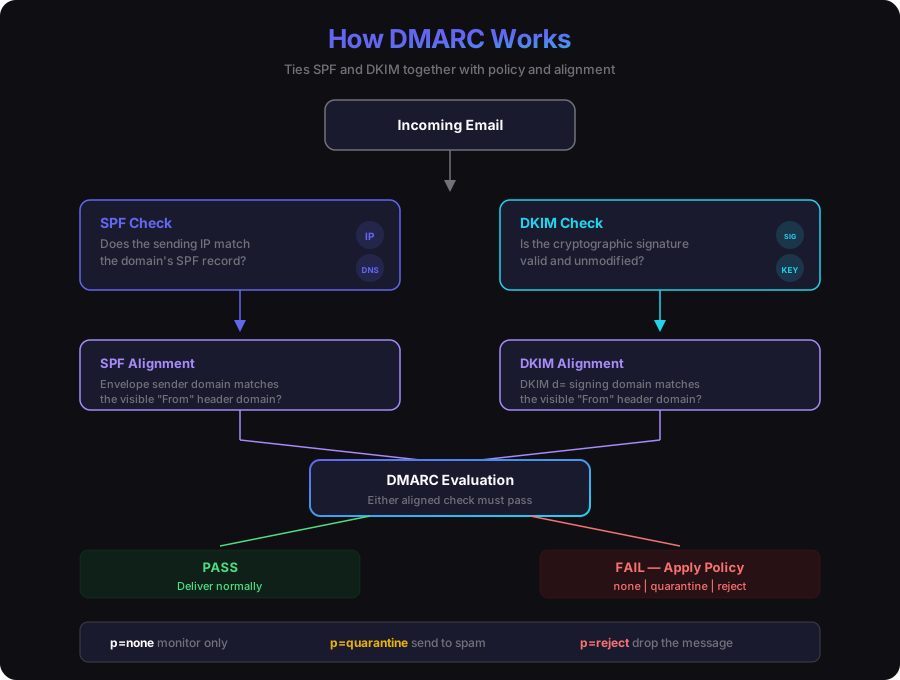
Domain-based Message Authentication, Reporting & Conformance (DMARC) is the policy layer that ties SPF and DKIM together. It answers two questions:
- How should receiving servers handle messages that fail authentication?
- Where should they send reports about authentication results?
The alignment problem DMARC solves
Remember the gap I mentioned with SPF — that it validates the envelope sender, not the visible “From” header? And DKIM signs with a d= domain that could technically be different from the “From” domain?
DMARC introduces the concept of alignment. For a message to pass DMARC, either SPF or DKIM must not only pass, but the authenticated domain must align with the domain in the visible “From” header. Specifically:
- SPF alignment: the domain in the envelope sender must match (or be a subdomain of) the “From” header domain.
- DKIM alignment: the
d=domain in the DKIM signature must match (or be a subdomain of) the “From” header domain.
A message passes DMARC if at least one of these aligned checks passes.
This closes the loophole. An attacker can’t just pass SPF from their own domain while forging your “From” header — the domains won’t align.
What a DMARC record looks like
DMARC records are published as DNS TXT records at _dmarc.example.com:
v=DMARC1; p=reject; rua=mailto:dmarc-reports@example.com; pct=100; adkim=r; aspf=rp=reject— the policy: tell receivers to reject messages that fail DMARC. Other options arequarantine(send to spam) andnone(just report, don’t act).rua=mailto:dmarc-reports@example.com— where to send aggregate reportspct=100— apply the policy to 100% of messages (you can ramp this up gradually)adkim=r— relaxed DKIM alignment (subdomains are OK)aspf=r— relaxed SPF alignment (subdomains are OK)
The reporting mechanism
One of DMARC’s most underappreciated features is its reporting. When you publish a DMARC record with an rua address, receiving mail servers will send you aggregate reports — usually daily XML files — showing how many messages they saw from your domain, whether they passed or failed authentication, and which IPs were sending them.
This is incredibly valuable for visibility. Before you enforce a strict DMARC policy, you can run in p=none mode and just collect reports. You’ll discover all the places your domain is being used to send email — legitimate services you forgot about, shadow IT email tools, and actual spoofing attempts. It’s common to spend weeks or months in reporting mode before moving to enforcement.
The deployment path
Most organizations deploy DMARC gradually:
- Monitor: publish
p=nonewith reporting enabled. Collect data. Identify all legitimate senders. - Quarantine: move to
p=quarantine— failed messages go to spam. Start with a lowpctvalue and increase. - Reject: move to
p=reject— failed messages are dropped entirely.
Jumping straight to p=reject without the monitoring phase is a reliable way to break your own email. You will have forgotten about that marketing tool, that transactional email service, or that legacy system that sends from your domain.
How They Work Together
Here’s the full picture when a message arrives at a receiving mail server:
- SPF check: look up the sender’s SPF record, check if the connecting IP is authorized.
- DKIM check: extract the DKIM-Signature header, look up the public key via DNS, verify the signature.
- DMARC evaluation: check if either SPF or DKIM passed with alignment to the “From” domain. Apply the domain’s DMARC policy if both fail.
A message only needs to pass one aligned mechanism (SPF or DKIM) to pass DMARC. In practice, you want both to pass — SPF as a first line of defense, DKIM as the more robust mechanism that survives forwarding.
Beyond the Big Three: ARC and BIMI
The email authentication ecosystem continues to evolve. Two newer technologies worth knowing about:
ARC (Authenticated Received Chain)
ARC addresses the forwarding problem more directly. When an intermediary server (like a mailing list or a forwarding service) modifies a message — breaking DKIM in the process — ARC allows the intermediary to attest to the original authentication results. Each intermediary in the chain adds its own ARC headers, creating a verifiable chain of custody. Receiving servers can use ARC data to make more informed decisions about forwarded messages that would otherwise fail DKIM.
ARC doesn’t replace DKIM — it supplements it for the specific case where legitimate intermediaries need to modify messages.
BIMI (Brand Indicators for Message Identification)
BIMI lets organizations display their logo next to authenticated emails in supporting email clients. It requires a valid DMARC policy at enforcement level (p=quarantine or p=reject) and a published BIMI record pointing to a verified SVG logo. Some mailbox providers also require a Verified Mark Certificate (VMC) from a certificate authority.
BIMI is primarily a brand trust signal — it gives recipients a visual indicator that a message is legitimate. It’s also a strong incentive for organizations to deploy DMARC, which is arguably its most important effect.
Practical Takeaways
If you’re an engineer who’s now responsible for email authentication at your organization, here’s where to start:
Audit your current state. Use a tool like MXToolbox or Google’s Check MX to see what SPF, DKIM, and DMARC records exist for your domain today. You might be surprised.
Start with DMARC in monitoring mode. Publish a p=none record with reporting. Collect data for at least a few weeks. Understand your email ecosystem before you start enforcing policies.
Get SPF right, but don’t rely on it alone. Publish an accurate SPF record, watch for the 10-lookup limit, and treat SPF as a complement to DKIM — not a replacement.
Invest in DKIM. If you control your sending infrastructure, DKIM is the most robust authentication mechanism. It survives forwarding, it provides integrity verification, and it’s the foundation for DMARC alignment.
Automate key management. If you’re operating at any meaningful scale, manual DKIM key rotation is not sustainable. Build or adopt tooling for key generation, DNS publication, and rotation.
Move toward DMARC enforcement. The industry is heading toward universal DMARC enforcement. Google and Yahoo both started requiring DMARC for bulk senders in 2024. If you’re not on a path to p=reject, you’re accumulating risk.
Email authentication isn’t glamorous, but it’s foundational. Every email your organization sends either builds or erodes trust with mailbox providers, and authentication is how you prove you are who you say you are. Get it right, and your messages land in the inbox. Get it wrong, and they land in spam — or don’t land at all.
The protocols are old, the specs are dense, and the edge cases are real. But the core concepts are straightforward. SPF checks the server. DKIM checks the message. DMARC ties them together with policy and reporting. Everything else is implementation detail.
And implementation detail, as we all know, is where the interesting engineering lives.